

RECENT POSTS


How to Write Better AI Prompts for Crafters (Without Guessing)
If you've ever spent 20 minutes writing an AI prompt…
Only to get an image that looked nothing like what you imagined...
You're definitely not alone.
One missing detail can completely change the final image.
Maybe the character suddenly has blue hair instead of brown.
Maybe the background is cluttered when you wanted something clean.
Maybe the text is misspelled (again).
Or maybe the image looks amazing…but isn't usable for a t-shirt, sublimation design, or printable.
The truth is, AI isn't bad at creating artwork.
AI image generators are not perfect, but vague instructions give them even more room to make unexpected choices. A stronger prompt cannot guarantee a perfect image, but it can significantly improve your chances of getting a result that matches your vision.
The better your instructions, the better your results.
Think of AI like hiring an illustrator. If you tell an artist, "Draw a teacher," you'll get one version.
But if you say:
Create an elementary teacher with curly red hair wearing a sunflower cardigan, standing in front of a classroom decorated for fall, smiling while holding a stack of books, illustrated in a colorful watercolor style with a transparent background.
You're much more likely to receive something close to what you pictured.
That's exactly how prompt writing works.
Why Most AI Prompts Don't Work
Many beginners assume AI only needs a short sentence.
Something like:
Cute teacher PNG
The AI now has to make hundreds of creative decisions for you.
What age?
What clothing?
What colors?
What hairstyle?
What art style?
What lighting?
What background?
What expression?
Because none of those choices were specified, the AI simply guesses.
And every time it guesses...
You get a different result.
That's why one prompt may generate ten completely different images.
The problem isn't randomness.
It's missing information.
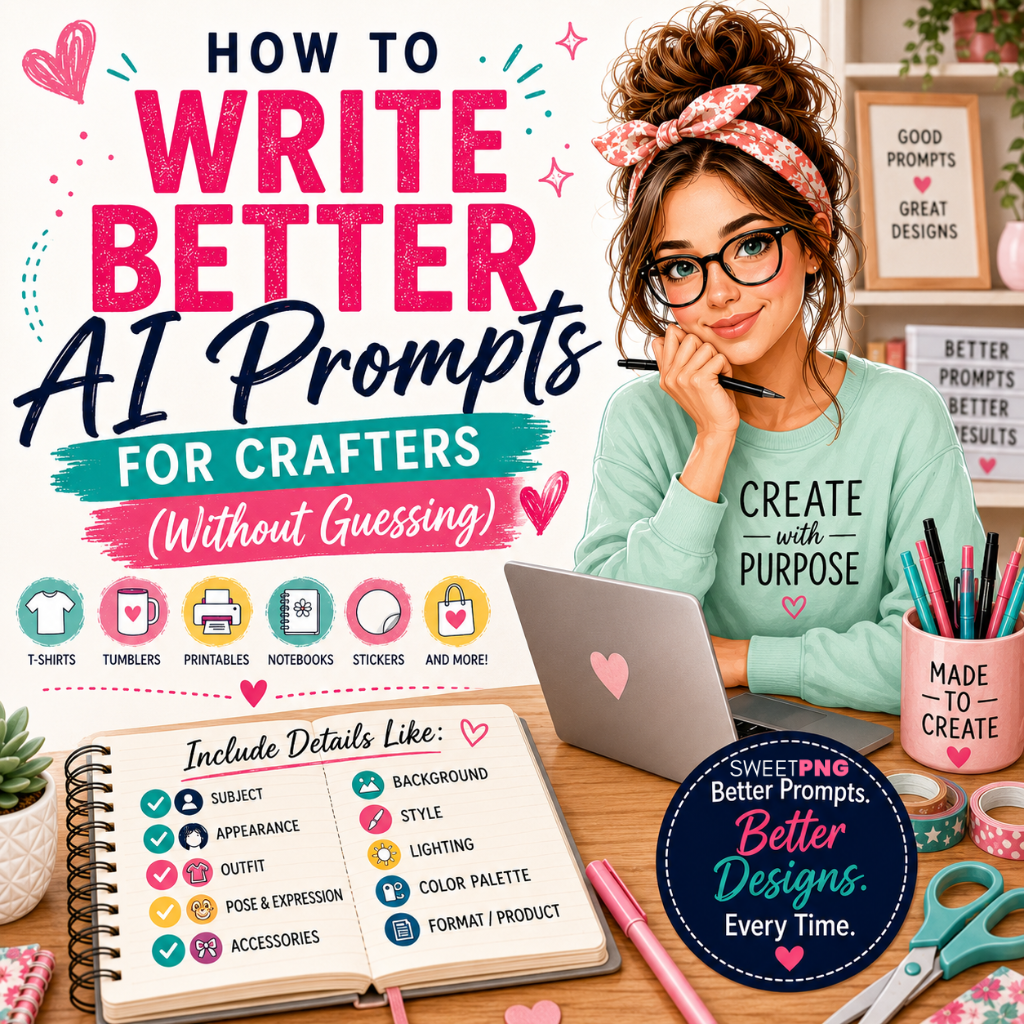
Think in Categories Instead of Sentences
One of the biggest breakthroughs when writing prompts is realizing you don't have to think in complete sentences.
Instead...
Think in categories.
Professional prompt writers mentally work through a checklist.
 The image above shows how each category adds another layer of direction. You do not have to include every detail in every prompt, but the more intentional your choices are, the less the AI has to invent for you.
For example:
Subject
Who are we creating?
- Teacher
- Student
- School Bus Driver
- Nurse
- Bear
- Pumpkin
- Highland Cow
Appearance
What should they look like?
- Age
- Skin tone
- Hair color
- Hair style
- Eye color
- Body type
- Facial features
Clothing
Instead of saying:
School clothes
Describe them.
Examples include:
- Denim overalls
- Converse sneakers
- Floral dress
- Cardigan
- Cargo pants
- Plaid skirt
- Letterman jacket
Pose
How are they standing?
Examples:
- Peace sign
- Holding books
- Jumping
- Sitting
- Waving
- Hands on hips
- Looking over shoulder
Expression
Happy?
Laughing?
Confident?
Sleepy?
Excited?
These tiny details dramatically change the personality of the artwork.
Style
This is one of the biggest factors.
Examples include:
- Watercolor
- 3D illustration
- Cartoon
- Clay style
- Hand painted
- Pencil sketch
- Flat vector
- Vintage
- Retro
- Cute kawaii
Changing only the art style can make the exact same character look completely different.
Background
Many people forget this part.
Instead of letting AI invent something...
Tell it exactly what you want.
Examples:
- Transparent PNG
- Classroom
- White background
- Floral background
- Chalkboard
- Composition notebook pattern
Or even...
No words in the background.
That one instruction alone can save a lot of cleanup time.
Keep in mind that not every AI image generator creates true transparent backgrounds. You may still need to remove the background afterward, depending on the tool you use.
Lighting
Lighting changes the mood.
Examples include:
- Soft morning light
- Golden hour
- Bright studio lighting
- Cinematic lighting
- Warm sunlight
Color Palette
Instead of hoping for pretty colors...
Choose them.
Examples:
- Pastels
- Earth tones
- Bright primary colors
- Jewel tones
- Neutral farmhouse colors
The Secret Is Layering Details
Think of a prompt like building a sandwich.
One ingredient isn't enough.
Instead of writing:
Cute school girl
You gradually build the description.
Start with:
Elementary school girl
Then add:
Brown curly hair
Then:
Pink cardigan
Then:
Holding books
Then:
Standing in front of a school
Then:
Watercolor illustration
Then:
Transparent PNG
Then:
Bright cheerful colors
Each detail removes uncertainty.
The AI doesn't have to guess.
Why Crafters Need Different Prompts Than Everyone Else
This is where many tutorials miss the mark.
Most AI prompt advice is written for artists creating digital paintings.
Crafters need artwork that works on actual products.
If you're creating designs for:
- Sublimation
- DTF transfers
- Stickers
- T-shirts
- Tumblers
- Composition notebooks
- Printable wall art
- Invitations
…your prompts should include production-friendly details.
For example:
- Transparent background
- Centered composition
- Clean edges
- High detail
- Balanced layout
- Printable design
- Space for text if needed
- No unnecessary objects near the edges
Thinking about the final product while writing the prompt can save hours of editing later.
Don't Expect the Perfect Image on the First Try
Even experienced AI creators rarely get exactly what they want on the first attempt.
Instead of starting over...
Adjust one variable at a time.
Try changing:
- The lighting
- The pose
- The hairstyle
- The art style
- The color palette
- The camera angle
Small changes often produce dramatically better results.
Changing five things at once makes it harder to figure out what actually improved the image.
Save Your Best Prompt Recipes
One mistake beginners make is writing every prompt from scratch.
Instead...
Create reusable prompt templates.
- For example:
- Subject
- Appearance
- Outfit
- Accessories
- Pose
- Background
- Style
- Lighting
- Color Palette
- Product Format
Once you have a framework, creating new prompts becomes much faster.
Instead of reinventing the wheel every time, you're simply swapping out pieces.
There's No Magic Prompt
One of the biggest myths online is that there's a secret paragraph professional prompt writers use.
There isn't.
Great prompts aren't built from magic words.
They're built from thoughtful, specific instructions.
The more clearly you describe what you want, the more consistently AI can deliver it.
Make Prompt Writing Easier
If you're tired of staring at a blank screen wondering what to type next, you're not alone.
That's exactly why I created the SweetPNG Prompt Studio™.
Instead of trying to remember every detail that makes a great prompt, the Prompt Studio walks you through the process step by step. You simply make your selections—like character, hairstyle, outfit, pose, art style, lighting, background, and more—and it builds a detailed prompt for you.
It's designed specifically with crafters in mind, whether you're creating sublimation designs, DTF transfers, notebook covers, stickers, tumblers, or printable products.
The goal isn't to replace your creativity—it's to remove the guesswork so you can spend more time creating and less time rewriting prompts.
Final Thoughts
Writing better AI prompts isn't about memorizing complicated formulas or finding a hidden list of "magic" words.
It's about giving AI clear, specific directions.
When you think in categories instead of short sentences, layer in meaningful details, and write with your finished product in mind, you'll get more consistent and usable results.
Like any creative skill, prompt writing improves with practice. The more you experiment and refine your approach, the easier it becomes to turn the ideas in your head into designs you can actually use.
So the next time you're tempted to type just a few words and hope for the best, slow down and build your prompt with intention. Your future self—and your finished designs—will thank you.
Make Prompt Writing Easier with our SweetPNG Prompt Studio™
Frequently Asked Questions
How long should an AI image prompt be?
There is no perfect word count. A prompt should be long enough to clearly describe the subject, appearance, style, background, composition, and intended use without adding unnecessary or conflicting details.
Why does the same AI prompt create different images?
Most AI image generators include an element of variation. Even when you reuse the same prompt, the composition, clothing, facial features, and background may change. More specific instructions can improve consistency, but they will not eliminate variation completely.
Can AI-generated images be used for products you sell?
That depends on the terms of the AI platform you use and whether the finished design contains protected characters, logos, trademarks, or other copyrighted material. Always review the platform’s current commercial-use terms before selling AI-generated artwork.
Related post
18
Jul
29
Sep
10
Aug
30
Jan
23
Jan


